If you’ve ever stood in front of a production line, heard an electric motor cut out without warning, and seen the red “overload trip” light blinking on the control panel, you know how disruptive that can be. I’ve been selling thermal overload protectors for 12 years now, and in that time, I’ve heard every question from maintenance techs, plant managers, and electricians—none more common than “How do I clear this thing without breaking the motor, or worse, making the problem come back tomorrow?” Thermal Overload Protectors
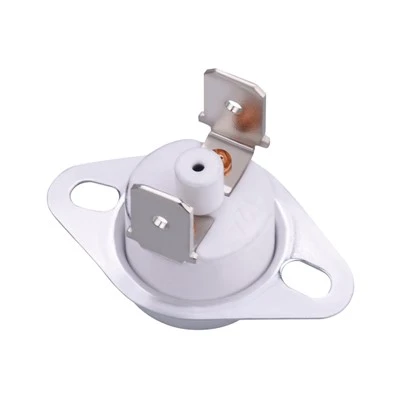
This isn’t just about hitting a reset button. Thermal overload trips happen when a motor’s internal temperature rises too high, usually from overloading, blocked ventilation, or a faulty part that makes the motor work harder than it should. The thermal overload protector (TOL) I supply is the first line of defense here—it trips to shut the motor off before the winding insulation melts, which would cost you thousands in repairs and downtime. Clearing the trip safely means respecting why it tripped in the first place, following a step-by-step process, and making sure your protector is working right long after you get the motor running again.
Let’s break this down like I do with every new customer: start with stopping, don’t rush.
Step 1: Power Off and Lock Out (No Exceptions)
The number one mistake I see is someone walking up to a tripped motor, seeing the light is on, and trying to reset it without cutting power. That’s a dangerous move. Even if the motor isn’t spinning, the terminals still hold voltage, and a wrong step could lead to shock, or worse, the motor lurches to life the second you hit the reset.
First, flip the main disconnect switch for that motor. If your plant uses a circuit breaker, turn it off fully—don’t just rely on the motor’s on/off button. Then, use a lockout/tagout (LOTO) device to make sure no one accidentally turns the power back on while you work. This isn’t just OSHA stuff; it’s the way you protect yourself. I’ve had a customer call me two years ago saying a tech got burned when the motor fired up mid-reset—they skipped this step, and it cost them a week of lost production.
Once power is off, give the motor time to cool. Thermal overload protectors work on bimetallic strips or eutectic alloys that warp when heated, tripping the mechanism. It’s like a thermostat in your house: if it gets too hot, it stays off until it cools back down. A small motor might take 10 to 15 minutes, but a large industrial motor—like the ones that run conveyors or pumps—could need 30 minutes or more. Never try to reset it before it’s cool; you’ll just trip it again, or damage the protector permanently. If you’re in a hurry, you can blow compressed air on the motor’s fins (use low pressure, so you don’t bend the fins) to speed cooling, but don’t lean on the motor or touch hot surfaces.
Step 2: Find and Fix the Root Cause
This is where most people skip ahead, and it’s why trips keep happening. A thermal overload tripping isn’t a fault—it’s a warning. If you clear the trip without fixing what made it trip, you’re just setting yourself up for a repeat. Let’s go through the most common causes, and how to check them.
First, check the load on the motor. Overloading is the number one cause. If your motor runs a pump, is the impeller clogged with debris? If it runs a conveyor, is there extra material stuck on the belt that’s making the motor work harder than its rated load? To test this, look at the amperage draw on the motor’s circuit. Every motor has a full-load amperage (FLA) rating on its nameplate—compare that to the running amps. If it’s consistently above FLA, you’ve got an overload. Fix that first: unclog the impeller, remove extra material from the conveyor, or adjust the load so it matches what the motor is designed for.
Next, check ventilation. Motors need air to stay cool. If the vents on the motor are blocked by dust, oil, or debris, the heat can’t escape, so the protector trips even if the load is normal. This is super common in sawmills, food processing plants, and dusty manufacturing facilities. I supply protectors with higher temperature ratings for these environments, but even a good protector can’t work right if the motor overheats from poor ventilation. Use a soft brush or compressed air to clean out the vents—just be careful not to push dirt deeper into the windings.
Another common issue is a faulty component that makes the motor work harder. For example, a bad bearing can cause the motor to bind, so it needs more current to turn. Or a misaligned belt or gearbox adds extra friction. Check for unusual noise from the motor, or if it’s vibrating more than usual. If you find a bad bearing, replace it before resetting the motor—otherwise, the protector will trip again in a few hours.
Wait, what if you don’t find an obvious cause? Sometimes a loose wire or a problem with the power supply can trigger a false trip. If the voltage is too low, the motor will draw more amps to make up for it, leading to overheating. Test the voltage at the motor terminals with a multimeter—should be within 10% of the nameplate rating. If it’s too high or too low, talk to your electrician about fixing the power supply. Also, check the wiring for loose connections: a loose wire causes resistance, which creates heat, and that heat can trip the thermal protector. Tighten any terminal screws, but make sure you don’t over-tighten them, which can damage the wires.
Step 3: Locate and Identify the Thermal Overload Protector
Now that you’ve fixed the root cause, it’s time to find the protector. On most small to medium motors, the TOL is located inside the motor’s terminal box, usually mounted on the contactor or the motor’s winding leads. For larger industrial motors, it might be in a separate control panel. If you’re not sure where it is, check the motor’s manual— it will tell you exactly where the protector is, and its part number.
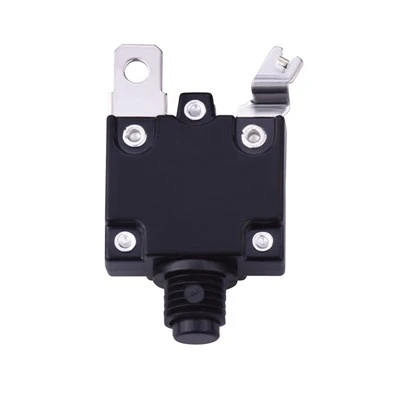
When you open the terminal box, you’ll see a small reset button on the protector, usually located on the front of the device. It might be labeled “RESET” or have a small red or black button. Important: some protectors are automatic reset, meaning they reset on their own once cooled, but most are manual reset, which is what I supply for most industrial applications. Automatic reset can be convenient, but it’s a safety hazard because it will restart the motor without anyone knowing, which can cause injury. That’s why I recommend manual reset for most facilities—you have to intentionally trigger it, so you know when the motor is ready to run.
Don’t confuse the thermal overload protector with a circuit breaker or a fuse. A circuit breaker protects the entire circuit from short circuits, while the thermal overload protector protects the motor specifically from overheating. Fuses also protect against short circuits, not overloads. If you trip a circuit breaker, it will feel like a hard click, and you can reset it immediately (once power is off), but a thermal overload protector will only reset when the motor is cool.
Step 4: Reset the Protector Correctly
Once the motor is cool and the root cause is fixed, you’re ready to reset. Here’s how to do it right, without damaging the protector.
First, make sure the terminal box is closed properly. If you leave it open, dust or moisture can get inside the protector, which will cause it to trip prematurely. Also, the cover protects the wiring, so don’t skip this step.
Then, press the reset button firmly. Don’t push it half-way—you need to feel a click, which means the internal mechanism has reset. If the button is hard to press, don’t force it. That means the motor isn’t cool enough yet, or there’s still excess heat in the protector. Wait a few more minutes, then try again. If it’s still hard to press, go back and check if the root cause is actually fixed—maybe you missed a clog or a loose wire.
Once you reset the protector, wait 30 seconds before you turn the power back on. This gives the protector time to seat properly, so it’s ready to respond to any future overheating. Then, turn the main disconnect switch back on (or flip the circuit breaker). Don’t jump to turning the motor on right away. Monitor it for the first 10 minutes of operation. Watch the amperage to make sure it’s not above the FLA rating, and listen for any unusual noise. If it starts to trip again within an hour, you missed the root cause—go back and check your load, ventilation, and wiring.
Common Mistakes That Lead to Repeat Trips
I see these mistakes all the time, and they’re the reason customers come back to me saying their protectors aren’t working. Let’s clear them up:
-
Using the wrong protector size: Every motor has a specific thermal overload protector size. If you buy one that’s too small, it will trip unnecessarily. If it’s too big, it won’t trip when it should, which lets the motor overheat and get damaged. I sell protectors sized to match the motor’s FLA, so they trip at exactly the right temperature. Always check the motor nameplate when buying a new protector—never guess.
-
Ignoring minor trips: If a motor trips once, it’s easy to reset it and forget about it. But repeated trips wear out the protector, and eventually, it won’t work at all. That’s a big problem—if the protector fails, the motor will burn out. Keep a log of every trip, so you can spot patterns: if it trips every Monday morning, that means weekend dust clogged the vents, so you can schedule a weekly cleaning.
-
Resetting without fixing the cause: This is the biggest one. I had a customer last year who reset a tripped motor 17 times in a day, because he didn’t check for a clogged conveyor. The motor’s windings burned out, costing him $8,000 in repairs and 3 days of downtime. The protector didn’t fail—he just didn’t fix the problem.
How to Keep Your Thermal Overload Protector Working Long-Term
Clearing a trip is just one part of maintenance. To avoid trips and extend the life of your protectors, do these things every quarter:
- Clean the motor’s vents and check the wiring connections.
- Test the protector periodically by heating it gently (follow the manual) to make sure it trips at the correct temperature. A protector that doesn’t trip when it should is as bad as a protector that trips too early.
- Keep a spare protector on hand. If one fails, you don’t want to wait a week for a replacement. The ones I supply are easy to install, so you can swap one out in 10 minutes.
If you’re dealing with frequent trips, or you need to upgrade your protectors to prevent motor damage, I’m here to help. We work with all types of facilities, from small shops to large manufacturing plants, to find the right protector for your motors.
Don’t let a preventable trip turn into a costly breakdown. Reach out to us to discuss your motor protection needs, and we’ll help you find a solution that keeps your equipment running smoothly, safely, and without unnecessary downtime.
References
Bimetallic Strips Electric Motor Repair and Maintenance Handbook. National Electrical Manufacturers Association (NEMA).
Occupational Safety and Health Administration (OSHA) Lockout/Tagout Standard.
Thermal Overload Protector Design and Application Guide. International Electrotechnical Commission (IEC).
Yueqing Ganen Electronic Technology Co., Ltd.
As one of the most professional thermal overload protectors manufacturers and suppliers in China, we also support customized service. Please feel free to wholesale advanced thermal overload protectors in stock here from our factory. Welcome to contact us for quotation.
Address: No.6 yonghe 3rd Road, Chengdong Industrial Functional Zone, Chengdong Street, Yueqing City, Wenzhou City, Zhejiang Province, China.
E-mail: daiaohui@163.com
WebSite: https://www.ganensj.com/
