If you’ve ever had a Socket Box start feeling way too hot when you’re mid-project, you know how stressful that can get. As someone who’s been supplying Socket Boxes for years, I’ve heard way too many horror stories from users who lost entire days of work, or even damaged their gear, because their unit overheated. Let’s cut the crap—overheating isn’t just annoying, it’s a real problem that can kill your Socket Box way before its time. The good news? Fixing and preventing it is way simpler than you might think, and I’m here to break it down like I would to a friend who just asked for my advice. Socket Box
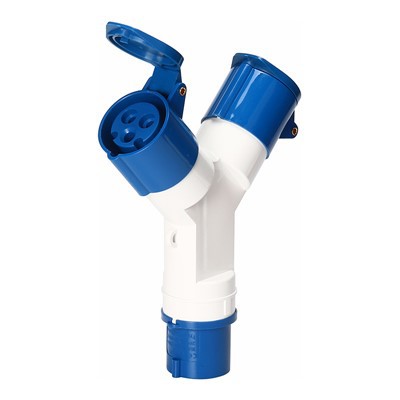
First, let’s get one thing straight: Socket Boxes aren’t made to be tucked away in dark, cramped corners. I see it all the time—users slide theirs under a desk, stuff it behind a TV cabinet, or even tuck it into a toolbox with a bunch of other heavy gear. That’s a recipe for disaster. Heat doesn’t just disappear, right? It needs a way to escape. If your Socket Box is surrounded by things that block airflow, all that heat builds up inside and makes the unit work way harder than it should. I remember a guy who messaged me last year saying his Socket Box was shutting down out of nowhere, and when I asked where he had it, he went, “Oh, I put it under my workbench so I didn’t trip over it.” Dude, the workbench is a solid block of wood—no air can get in or out. I told him to just move it out on top of the bench, even just a few inches, and he was back to running his projects in an hour. That’s how simple it can be.
Wait, but what if you have to tuck it somewhere? Maybe your setup is tight, or you don’t have extra desk space. Then you need to get creative with the airflow. A lot of users don’t realize that most Socket Boxes have built-in vents—little slots on the sides, top, or bottom. If those vents are covered, even by a dust bunny (and trust me, dust bunnies are real), your heat can’t escape. I recommend checking those vents every couple of months, especially if you work in a dusty space. A can of compressed air, held a few inches away, blows that dust right out without damaging anything. And if you’re really stuck for space, a small desk fan—like the ones you use for your laptop—can help blow cool air towards the vents. Just don’t point the fan directly at the unit 24/7, that might cause condensation, which is another whole problem. Keep it a foot or so away, just enough to keep air moving.
Next up: power load. This is a big one that so many sleep on. Your Socket Box has a maximum power rating—like, how much total stuff you can plug into it without overloading. If you’re running a 1000W power tool, a 500W space heater, and a laptop that’s pulling 150W all at the same time, that’s way over the limit. I’ve seen users do this and then wonder why their Socket Box feels like a hot stone. The unit’s circuit breakers are there to protect it, but if you’re consistently pushing it past its limit, it’s going to overheat over time, even if it doesn’t shut down immediately. How do you check the load? Most Socket Boxes have a little display on the front, or if you’ve got a basic model, add up the wattage of everything plugged in. As a supplier, I always tell users to stay 10-15% under the max rating—like if your box is rated for 1500W, only plug in stuff that adds up to 1350W. That extra headroom keeps the unit from working too hard, which means less heat. Oh, and don’t daisy-chain another power strip to your Socket Box. That’s double the risk, and a lot of people don’t realize that’s not allowed. I get questions about that all the time, so I’ll say it straight: don’t do it. It’s a fire hazard, and it’ll definitely make your Socket Box overheat.
Then there’s the environment itself. Where you’re using your Socket Box matters a lot. If you’re working in a garage in the middle of summer, where the temperature is 90°F outside, that’s way harder on your unit than if you’re in an air-conditioned office. Socket Boxes are designed to handle a range of temperatures, but extreme heat is a killer. I have a lot of users in construction who work outside sometimes, and they tell me their Socket Box holds up fine as long as they keep it in the shade. If you have to use it in a hot space, try not to leave it in direct sunlight, and maybe pull it out of the garage at the end of the day so it can cool down fully. On the flip side, cold weather isn’t as big a problem, but if you’re going from a freezing outdoor space to a warm indoor one, let the unit acclimate for an hour before plugging it in. That prevents condensation, which can corrode the internal parts and cause overheating later.
Maintenance is something most people skip until it’s too late. I know, it’s not the most fun part of owning gear, but it’s key. I recommend giving your Socket Box a quick check every three months. First, the vent thing I mentioned earlier—dust clogs are the number one cause of airflow issues. Then, check the power cords for frays or damage. A frayed cord can cause extra resistance, which generates more heat. If you see a fray, don’t use the unit until you replace the cord. Also, if your Socket Box has any fans (some models do), make sure they’re running smoothly. If a fan is making weird noises or slowing down, that’s a sign it’s about to go out, and then you’ve got no airflow. As a supplier, I always stock replacement fans for exactly that reason—easy to swap out, no need to send the whole unit in for repair. That saves you time and money.
Wait, let’s talk about the “symptoms” to watch for. How do you know your Socket Box is overheating before it shuts down? There are a few telltale signs. First, it feels hot to the touch—if you can’t hold your hand on the side for more than a couple seconds, that’s a red flag. Second, your plugged-in devices start acting weird—laptops freezing, power tools cutting out mid-use, lights flickering. Third, the unit itself might be blinking a warning light—most models have a little LED that turns red when it’s overheating, so check your manual to know what that means. If you see any of these, don’t just ignore it. Pull out a few devices to lighten the load, move the box to a more ventilated spot, and let it cool down. If it keeps happening even after you do all that, you might have a bigger issue, and that’s when you should reach out.
Now, a few common myths that I hear all the time, and I want to bust them so you don’t get fooled. First myth: “If it’s on, it’s fine.” No, that’s not true. A Socket Box can be running perfectly, but still building up heat on the inside that you can’t feel on the outside. By the time it feels hot, it’s already under a lot of stress. Second myth: “More power outlets mean more overheating.” Not really—what matters is the total wattage, not how many sockets there are. You could have a Socket Box with 10 sockets, but if you only plug in a phone charger and a lamp, it’s not going to overheat. Third myth: “I need to leave it on 24/7 to keep my gear ready.” Unless you’re running something that needs constant power, turning your Socket Box off when you’re done using it is actually better. It cools down fully, and there’s no idle load generating heat. That’s a win-win.
As someone who’s been in this game for years, the biggest mistake I see users make is not investing a little bit of thought into how they’re using their Socket Box. It’s not just a dumb power hub—it’s a piece of equipment that needs to be treated right to last. I’ve had customers tell me their Socket Box is still going strong after 5 years, just because they followed these simple steps, and others who had to replace it every year because they stuffed it in a closet and overloaded it nonstop. The difference is really that small.
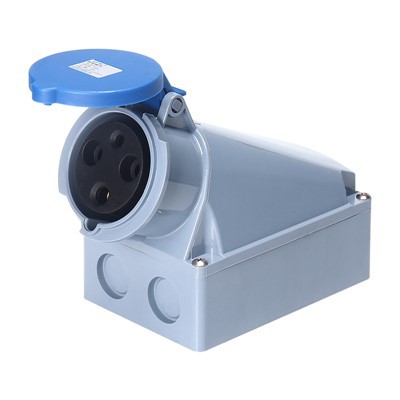
If you’re not sure which Socket Box is right for your setup, or you’re having issues with overheating that you can’t figure out, hit me up to talk shop. I don’t do fancy sales pitches—just straight talk about what works and what doesn’t. We can go over your setup, figure out if you need a different model, or if a few simple tweaks will fix the overheating problem. Don’t let a hot Socket Box ruin your projects or damage your gear—let’s get you sorted out.
Industrial Plug and Socket References
- Electrical Safety Foundation International. "Portable Power Tool Safety Guidelines." 2023.
- Underwriters Laboratories. "Safety Standards for Power Distribution Units." 2022.
- U.S. Department of Energy. "Energy Efficiency Tips for Home and Workshop Equipment." 2021.
- Consumer Electronics Association. "Best Practices for Cooling Electronic Devices." 2022.
Zhejiang Hefeng Electric Co., Ltd.
Zhejiang Hefeng Electric Co., Ltd. is one of the most professional socket box manufacturers and suppliers in China, featured by quality products and low price. Please rest assured to buy durable socket box made in China here from our factory. Also, OEM service is available.
Address: Wenzhou Daqiao Industrail Park, Beibaixiang Town, Yueqing City, Zhejiang Province, China
E-mail: hefengplug@chinahfe.com
WebSite: https://www.hfcee.com/
